
Your AI Doesn't Need to Read the Whole Failed Build. We Tested It.
When a build or test run fails, the log is often huge. An AI agent asked "why did this fail?" usually reads all of it, and you pay for every line, including thousands of lines that say everything went fine.
AI models read and charge by the token, a small chunk of text that is often part of a word. More tokens means a bigger bill.
Our tool, Log Squeezer, reads the log for your AI and hands back a short summary: what failed, where, and the error lines that explain why. You give it a link to the log, such as a GitHub Actions job page. We tested it on 9 real failed logs. It cut 95% to 99.5% of the tokens and kept the cause of the failure on almost every log. It costs under a cent (about 10 sats) per log up to 2 MB.
What's in a failed log?
A typical failed run prints every step: downloading tools, installing packages, setting up, running hundreds of tests that pass. The actual failure might be five lines somewhere in the middle.
There are three common ways to give a log to an AI:
- The raw log. Every line, all the noise included.
- The last 200 lines. A common shortcut. It's small and free, but it only works if the failure is near the end.
- Log Squeezer. A short summary with counts, the key error lines, and where they happened.
The results
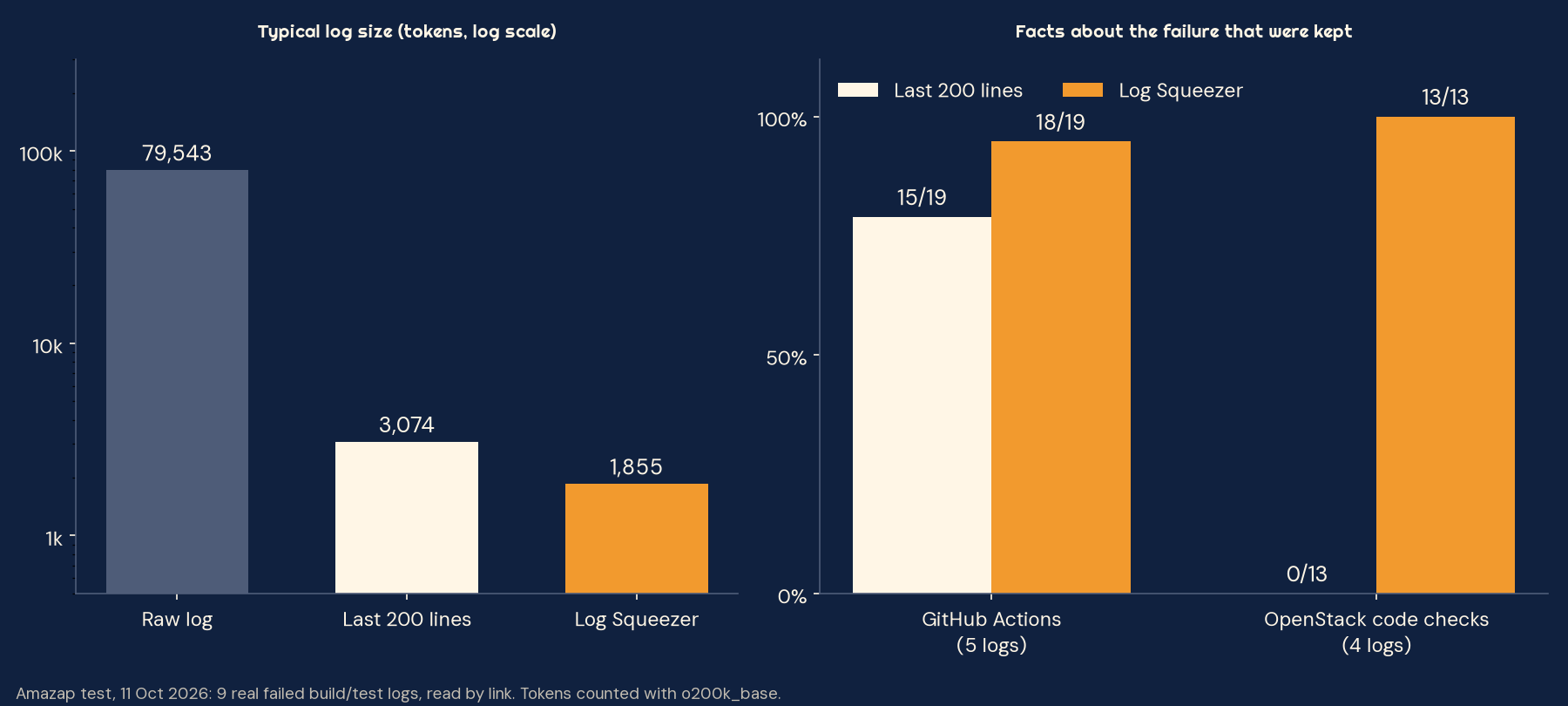
We used 9 real failed logs: 5 from open-source projects on GitHub Actions (pytest, Vite, Prometheus, Cargo and Jest) and 4 from OpenStack's public test system, including three code-style checks. Every log was given to Log Squeezer as a link.
| Typical log | Size (tokens) |
|---|---|
| Raw log | 79,543 |
| Last 200 lines | 3,074 |
| Log Squeezer | 1,855 |
Some logs are much bigger. One OpenStack code check log was 632,983 tokens, nearly 2 MB of text. Reading it once on an AI model that charges $4 per million tokens of input, like Claude Opus 5.5, costs about $2.53. Log Squeezer cut it to 2,907 tokens. After paying for the service, that's about $2.51 saved, on one read.
The Cargo log was 180,539 tokens raw. On the same $4 model, Log Squeezer saved about $0.70 on one read, after its price.
Smaller only helps if the answer is still there, so we checked. For each log we listed the facts a developer needs to fix it: which test or check failed, the file and line, and the error message.
- On the 4 OpenStack logs, Log Squeezer kept 13 of 13 facts. The last 200 lines kept 0 of 13. These logs end with cleanup steps, so the failure is nowhere near the bottom.
- On the 5 GitHub logs, Log Squeezer kept 18 of 19 facts; the last 200 lines kept 15 of 19. The one Log Squeezer missed was a single line of test code in the Vite log. The error message itself was kept.
Does it actually save you money?
It depends on your model and how you read logs today.
If your AI reads raw logs, almost always yes. We priced each of the 9 logs on 6 popular AI models, which makes 54 combinations. Log Squeezer came out ahead in 49 of 54 on a single read. Over a longer task where the AI rereads the log five times, it came out ahead in 53 of 54.
The 5 losses were all on the cheapest model we tried, at $0.10 per million tokens. Reading is so cheap there that the service price doesn't always pay for itself. The biggest loss was under one cent (about $0.007, on the smallest log).
If your AI only reads the last 200 lines, Log Squeezer usually costs a little more. The last 200 lines is free and already small, so on price alone it won in most cases. What you get for the extra fraction of a cent is the answer: on the OpenStack logs, the last 200 lines didn't contain a single fact about the failure.
In short, it pays most when your AI would otherwise read the whole log, uses a mid-priced or premium model, or keeps the log around over a long task. It also helps when you can't predict where in the log the failure will be.
What it can't do
- Some unrelated setup lines still show up in the error list. On the OpenStack logs, 2 to 4 of the listed lines were setup steps with words like "Fail if…" in their names. They're easy to skip, but they take up space.
- It doesn't explain the fix. It tells your AI what failed and where. Your AI still has to work out the fix.
- Logs over 2 MB aren't accepted. They're turned down before you pay.
- Nine logs is a small sample. Results depend on the kind of log. A log that's short to begin with leaves little to save.
Try it
Connect your AI app to the Amazap MCP (MCP is a standard way to plug tools into AI apps), then ask it to squeeze a failed build log by link. You see the price in sats before you pay: under a cent (about 10 sats) per log up to 2 MB. If a paid call fails, the price goes back to your balance as credit. To learn how AI agents pay for tools like this, see agentic payments on Amazap.
How we tested
- Logs: 9 public failed logs, all read by link: 5 GitHub Actions jobs (pytest, Vite, Prometheus, Cargo, Jest) and 4 OpenStack test jobs (three code-style checks and one docs build). Sizes ranged from 11,198 to 632,983 tokens.
- Counting: OpenAI's o200k_base tokenizer. Other models count a little differently, so exact costs vary.
- Facts kept: for each log, we listed the facts needed to fix the failure (failing test or check, file and line, error message) and checked whether each method kept them.
- Prices: input-token list prices from Anthropic, OpenAI and Google, checked 2026-10-10, for 6 models from $0.10 to $10 per million tokens, using each provider's higher price for very long inputs where it has one. Log Squeezer was 10 sats per log, about $0.0083 that day.
- Break-even: a log pays off when tokens saved × price per token × number of reads is more than the service price. On a $4 model that's about 2,070 tokens saved for one read; on a $2 model, about 4,140.
- Date: 2026-10-11.
- Full data: data_logs_v4.csv and costs_logs_v4.csv, with per-log numbers and per-model cost tables.
FAQ
Why are build logs so expensive for an AI to read?
A failed run prints every step, most of which worked. In our test a typical log was about 79,500 tokens, and the part that explained the failure was a few lines.
How much can Log Squeezer save?
It cut 95% to 99.5% of the tokens on 9 real logs. On a $4-per-million-token model, that saved about $0.70 on one 180,000-token log and about $2.51 on a 633,000-token log, after the service price.
Isn't reading the last 200 lines good enough?
Sometimes. It's free and small, and it kept most facts on the GitHub logs. But on 4 OpenStack logs it kept none of the 13 facts about the failure, because those logs end with cleanup steps. Log Squeezer kept all 13.
Can I give it a GitHub Actions link?
Yes. Give it the job page link and it fetches the real log. All 5 GitHub job links in our final test worked.
How much does Log Squeezer cost?
Under a cent (about 10 sats) per log up to 2 MB. The price is set in dollars, so the sats amount follows the bitcoin rate. That's the full price, and you see it before you pay. Larger logs are turned down before you're charged.