
Turn a PDF Into Text Your AI Can Read, 25 Sats for Up to 30 Pages
A lot of useful information lives in PDFs, such as research papers, reports, manuals and tax forms. When you hand your AI a link to one, it often can't use it. Many AI apps can't download a file from a link on their own, and a raw PDF file is not text that a model can read directly.
Our tool, PDF to Markdown, reads a public PDF for your AI and hands back clean text. It costs 25 sats (about 2 cents) for up to 30 pages, and short reads from 5 sats. The price scales with the pages read, with a 5-sat minimum, so 1 to 6 pages cost 5 sats. On the 59-page Lightning Network paper, it kept 99.98% of the words on the pages it read.
This is a short practical guide, not a full benchmark. It covers one worked example and a word check on 6 more PDFs.
What your AI gets back
PDF to Markdown returns Markdown, which is plain text with a few simple marks for headings, lists and tables. AI models read it easily.
- Headings are marked, so your AI can see how the document is organized.
- Split words are joined. Words broken across two lines with a hyphen are almost always put back together.
- Page counts are included. Each reply says how many pages it read and how many the PDF has, such as "pagesRead: 30 · totalPages: 59".
- You can pick pages. Your AI can ask for just pages 1-3, or any range of up to 30 pages per call. A longer document takes another call with the next range.
It reads public PDF links of up to 20 MB. If a PDF is a scan, which is a picture of pages with no text inside, there are no words to read, so the price is credited back to your credit balance.
One real example: the Lightning Network paper
We used the Lightning Network paper, a 59-page, 3 MB PDF. One call read the first 30 pages, which is the most one call can read.
| What your AI would read | Tokens |
|---|---|
| The whole PDF file, sent as base64 text | 2,931,859 |
| The same pages as text from pdftotext, a free tool | 11,773 |
| PDF to Markdown, pages 1-30 | 11,732 |
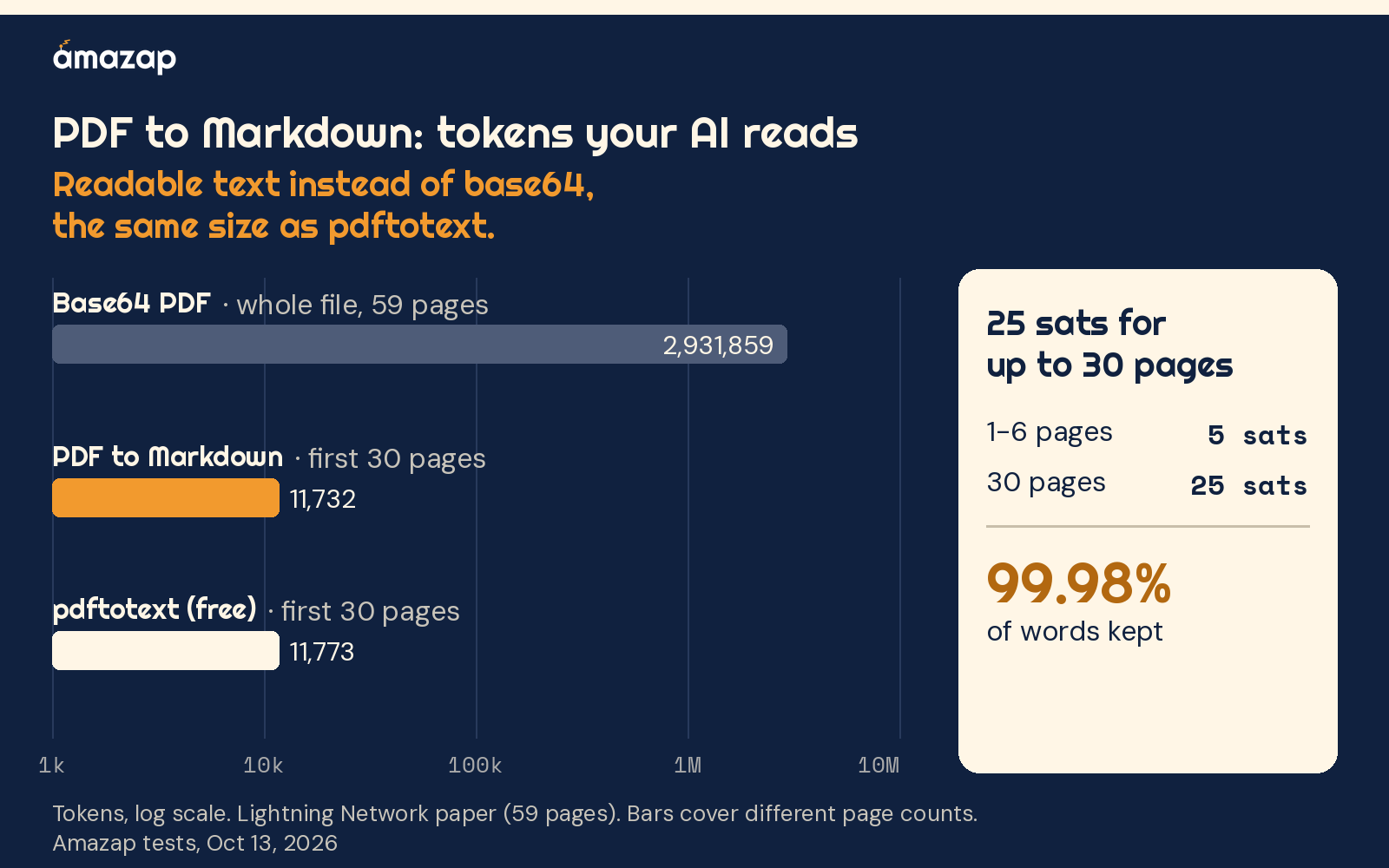
AI models read and charge by the token, a small chunk of text that is often part of a word. Base64 is a way of turning a file into text so it can travel inside a message, and some agents pass files along this way. Sent like that, this paper would be about 2.9 million tokens. That is more than most AI models can read at once. The text from PDF to Markdown was 11,732 tokens, which is about 250 times smaller (99.6% fewer tokens).
That comparison is with the raw file, so here is the fairer one too. Some AI apps have a built-in PDF reader that counts a PDF in its own way, and we did not measure those. A good text extractor is the other fair yardstick. The free tool pdftotext gave 11,773 tokens for the same 30 pages, which is almost exactly the same size.
So PDF to Markdown does not squeeze text smaller than other extractors do. Its value is that your AI gets the extracted text at all. In a chat app, your AI usually can't download a file and run a program like pdftotext on it. PDF to Markdown does that step for it, and it is a valuable shortcut for something your AI can't do alone.
Nothing important was lost. The text kept 99.98% of the words that pdftotext found on the same pages, and it marked the title and the main section headings. Each page came to about 390 tokens on average. On a model that charges $2 per million tokens of input, reading all 30 pages costs your AI about 2 cents, plus 25 sats (about 2 cents) for the read at today's price.
Does it keep the words on other PDFs?
We also checked 6 different kinds of PDF and counted how many of pdftotext's words each reply kept.
| Pages read | Words kept | |
|---|---|---|
| Research paper ("Attention Is All You Need") | 15 of 15 | 98.0% |
| Bitcoin white paper | 9 of 9 | 99.9% |
| One-page invoice | 1 of 1 | 100% |
| Federal Reserve statistics release (tables) | 11 of 11 | 100% |
| IRS W-9 tax form | 6 of 6 | 100% |
| University lecture slides | 30 of 73 | 97.9% |
Every reply kept about 98% of the words or more, and each one was close to the size of pdftotext's text. The slide deck was longer than 30 pages, so the reply covered the first 30 and said so.
When is it worth it?
It is worth it when your AI can't read the PDF itself. That is the usual case in chat apps. It also helps when you need only part of a long document. Because the price scales with the pages read, reading 3 pages of a 59-page paper costs 5 sats, the minimum, instead of 25 sats for a full 30-page read.
It is not worth it when you already have the text. If your AI app reads PDFs well on its own, or if you can run pdftotext on your own computer, you will get about the same text for free. It also can't help with private links, files over 20 MB or scanned PDFs, although a scan with no text is credited back.
How to use it
- Add Amazap to Claude or another AI app at amazap.com/mcp. (MCP is a standard way to plug tools into AI apps.)
- Give your AI a PDF link and a task, such as "Read pages 1-3 of this PDF and summarize them."
Your AI calls PDF to Markdown with the link and, if you like, a page range. Each call ends with a one-line receipt that shows what it cost. A full 30-page read is 25 sats, and anything from 1 to 6 pages is 5 sats. If a paid call fails, the price goes back to your credit balance. To learn how AI agents pay for tools like this, see agentic payments on Amazap.
How we tested
- Example file: the Lightning Network paper (lightning.network/lightning-network-paper.pdf), 59 pages and 3,068,667 bytes. PDF to Markdown read pages 1-30 on 2026-10-13.
- Counting: OpenAI's cl100k_base tokenizer. We counted the PDF to Markdown text without its one-line receipt, the whole file encoded as base64, and pdftotext's text for pages 1-30. Other models count a little differently, so exact costs vary.
- Words kept: the share of pdftotext's words, counted with repeats, that also appear in the reply. For the example file, that was pages 1-30.
- Six-PDF check: 2026-10-11, on the PDFs in the table above, compared with pdftotext on the same pages. This check used the o200k_base tokenizer for its size comparison.
- Prices: confirmed live on 2026-10-18: 25 sats for up to 30 pages, scaled by pages read (price × pages / 30), with a 5-sat minimum. Pages 1-6 cost 5 sats, and a full 30-page read costs 25 sats. The service is
amazap-basics-pdf.
See also: the API Spec Digest benchmark and the Package Facts benchmark.
FAQ
Why can't my AI just read the PDF link?
Many AI apps can't download a file from a link on their own. Even when they get the file, a raw PDF is not plain text. Sent as base64 text, the 59-page Lightning Network paper would be about 2.9 million tokens, which is more than most AI models can read at once.
How many tokens does PDF to Markdown save?
Compared with sending the raw file as base64 text, the first 30 pages of the Lightning Network paper came back about 250 times smaller, at 11,732 tokens instead of 2,931,859. Compared with a good free extractor like pdftotext, the size is about the same. The saving comes from your AI getting text instead of a file.
Does it keep all the text?
Almost all of it. It kept 99.98% of pdftotext's words on the Lightning Network paper, and between 97.9% and 100% on 6 other PDFs, including a research paper, a tax form and a table-heavy statistics release.
How much does it cost?
25 sats (about 2 cents) for up to 30 pages, and short reads from 5 sats. The price scales with the pages read, with a 5-sat minimum, so 1 to 6 pages cost 5 sats and a full 30-page read costs 25 sats. One call reads at most 30 pages.
What happens with a scanned PDF?
A scan is a picture of pages with no text inside, so there are no words to read. When that happens, the price is credited back to your credit balance.